Zoom for Web Conferencing; Removing Teams Info with One Click
Zoom is Marriner’s web conferencing platform of choice. The only exceptions are when we are mandated by customers or business partners to hold a meeting with another platform based on their security protocols or preferences. For any meetings we hold with internal team members and whenever possible with others outside the organization, we should be using Zoom.
Of note is ensuring you include the Zoom meeting link, at least one phone number and the meeting ID in your calendar invite. This is all needed as a back-up should the link not work for audio/video or should someone not be in front of a computer and need to join by phone.
Everyone in the Agency was assigned an account and should have it installed on your computer and integrated into Outlook. For additional info visit: https://atwork.marriner.com/software-tools/conferencing/zoom-conferencing-is-here/
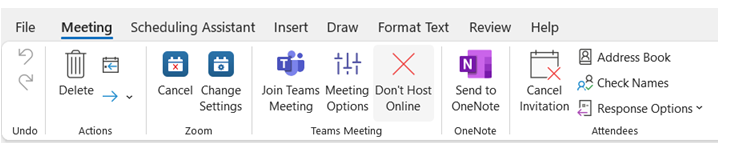
Issues arose when Microsoft adds Teams information as a default when you “Schedule a Meeting” through Outlook. To remove all the Teams info. in one easy step – click on “Don’t Host Online” – see this image snip for reference. This will still keep all of your Zoom info. intact. By having only one set of conferencing info. in the invite, it will cut down on the confusion for attendees on which one to join.
If you need additional assistance or have questions, please see Trey or Susan.
Was this post helpful?
Did you find what you were looking for? Is there anything that needs improvement?
Last modified: Thursday, November 17, 2022 at 10:35 am