Zoom Conferencing is Here!
Marriner Marketing’s continuous goal is to streamline systems and tools within the agency to increase productivity and make your everyday tasks easier. We chose Zoom as a single platform that can handle all of our conferencing needs and is integrated with Outlook to make scheduling meetings much simpler.
Key Zoom features and benefits:
- HD video and audio (can use computer or phone for audio)
- Screensharing with annotation capability
- Whiteboarding
- Record your meeting for later reference or distribution to attendees
- Schedule or join a meeting from any device
- Chat
Key steps to take to get set up:
- Be on the lookout for an email coming from Zoom to join the Marriner team. From there, you will create your password. Make sure you remember your password, as it will be needed when integrating Zoom with your Outlook.
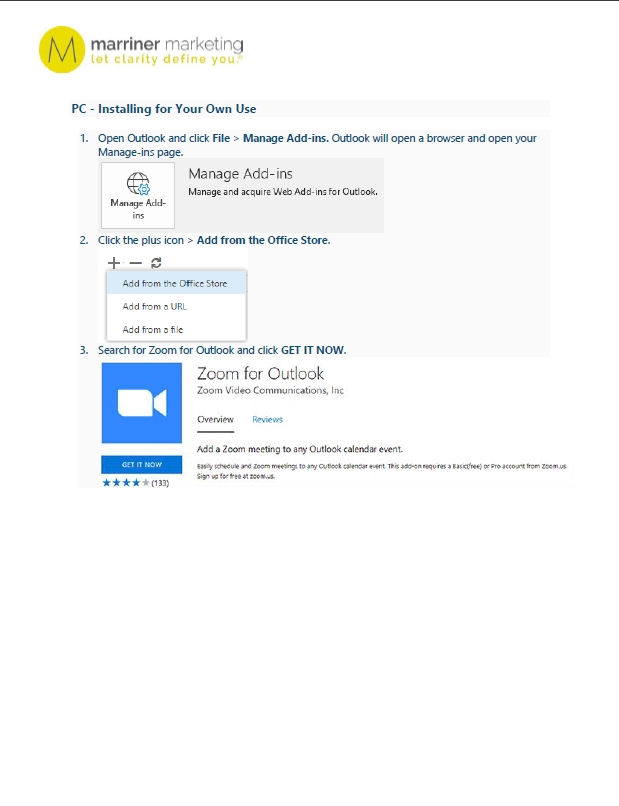
- You will need to get an Outlook Add-in for Zoom. This will allow Zoom to sync with your calendar and you can schedule a Zoom meeting right from Outlook. Below are instructions on how to do this on both Mac and PCs.
- Test by scheduling a meeting from the Zoom add-on. The meeting information should populate the body of the meeting request. Below are also steps for scheduling/editing a meeting.
If you have any questions or challenges, please reach out to Trey.
Happy conferencing!
Was this post helpful?
Did you find what you were looking for? Is there anything that needs improvement?
Last modified: Friday, February 4, 2022 at 10:28 am