Mechanical Time
What is mechanical or pre-press time?
This document should be referenced when you have questions about what goes into mechanical time and why your project needs the necessary mech time. For updates, please see April Dlugokeski.
**Last updated 5/7/2021
What is mechanical time (or pre-press time)?
This refers to the process of performing all the necessary quality assurance steps needed to create a file acceptable for print or digital use.
- Relinking multiple art files
- Ensuring that files link to the supporting art file
- Checking fonts for consistency
- Headers
- Footers
- Headlines
- Subheads
- Checking hyperlinks - are they working? Are they going to the right place?
- Be sure to include hyperlinks in the copy doc
- If they’re not live yet, please note that in the copy doc, and supply an ETA of when the page will be live
- Image Resolution - high-resolution is needed for print
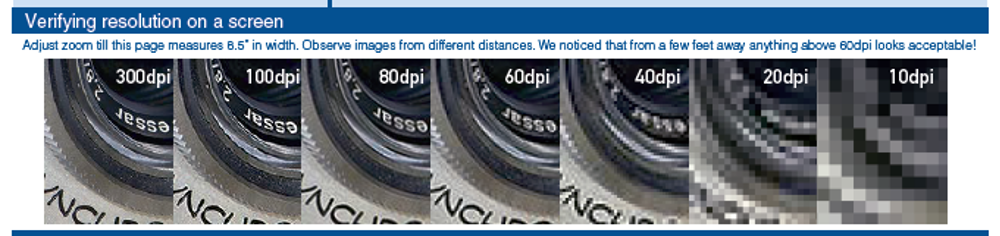
- Best to supply hi-res in general; that way, if an image needs to be resized, the quality will remain (see example 2 below for resolution dpi contrasts)
- Converting all RGB to CMYK
- All photos should be CMYK for print
- RGB for web use (websites)
- If the deliverable is for print use, after mechanical it will then need to go through InDesign’s preflight check (see example 1 below)
- “Print preflight, sometimes called prepress, is the practice in which a job is prepared for the final printing process. This means making a final run-though to confirm that digital file extensions, fonts, images, bleed formatting and other nitty-gritty details are all valid and compatible with the needs of the printer.”
- Checking pages for design consistency
- page numbers
- graphics lined up from page to page
- Spread crossovers are adjusted for printing
- Chart formatting is uniform
- Image quality
- Overall layout
Note - There is not half mech vs. full mech. There is just meching a project. The output is the difference (high/low-res, interactive, vector, etc.).
Going forward there will always be mech time on collateral projects. As an agency, we are held to a higher standard of quality. It is our duty to ensure that our files are accurate for future use.
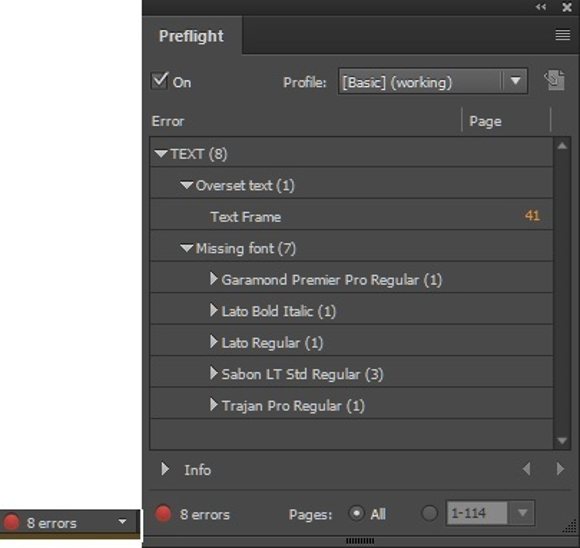
Example 1: This InDesign preflight example shows 8 errors within the document. These must be addressed before the file can be released to a client or vendor. Troubleshooting these errors takes time.
Example 2: Image resolution (72 dpi is optimal for online viewing; 300 dpi for print reproduction).
How can we make mech time run efficiently?
- If the final output is a pdf
- Will it need customer codes? This should be discussed during kickoff so creative can design for the spaces required for codes
- Does the client prefer spreads or single pages? This should be discussed during kickoff so creative can design for the spread crossovers if needed
- Make sure all supplied images are high-resolution
What is the Mech File Naming Convention?
- M1 = Smallest File Size, no hyperlinks
- INT = Smallest File Size with working hyperlinks
- HQ = High-Quality for image clarity, no crops or bleeds
- HQ-INT = High-Quality for image clarity with working hyperlinks
- PRT = Print-Ready files with crop and bleed
- SPRD = Print Spread layout
Was this post helpful?
Did you find what you were looking for? Is there anything that needs improvement?
Last modified: Wednesday, June 9, 2021 at 4:49 pm