Media Process + Close List Fun
This document should be referenced when/if there are questions about our media process. This document outlines roles and responsibilities, as well as Close List best practices to ensure all things media are filled out and released on time. Please see Megan Godwin/Wendy Simms with questions.
WHAT IS A CLOSE LIST?
- Marriner Marketing uses a close list for all media related jobs.
- The purpose of the close list is to keep track of all media assets (for trade, programmatic, and paid search & social), their due dates, creative names, UTM strings, and destination URLs so media can be trafficked to the appropriate person/pub to fulfill paid media programs.
- Close lists are populated via a Google Doc.
- The Close List is created by the channel owner once a plan is officially approved.
- Kate/Erica = Trade Channel Owner
- Oscar = Programmatic/Direct Channel Owner
- Noah = Paid search/social Channel Owner
- ***TBD = OTD Broadcast
- It is best to bookmark close list URLs for future reference.
CLOSE LIST CREATION
- Typically, the creation of the close list can be different from campaign to campaign.
- BUT All placements should be added to the close list within a week of plan approval.
- Communication of the close list should come from the channel owner. If the campaign includes multiple channels, communication comes from Kate/Erica. It is up to channel owners to then populate their individual lines items within that one week timeframe. Communication of plan approval should go in the appropriate planning job, and include ALL media team members and department heads.
- Account can then go into the close list and fill out all their items - 30 days out.
- NOTE: understand timing delays, but that should be the EXCEPTION not the rule.
- IT’S OK TO FILTER THE CLOSE LIST, BUT DO NOT SORT THE CLOSE LIST. PLEASE BE MINDFUL OTHERS ARE VIEWING THIS LIVE. PLEASE UN-FILTER ONCE YOU ARE DONE WITH WHAT YOU ARE LOOKING FOR.
- As discussed in 9/26 meeting, we will filter as needed and if this to not be working, please let Kate/Megan know.
CREATING THE CLOSE LIST
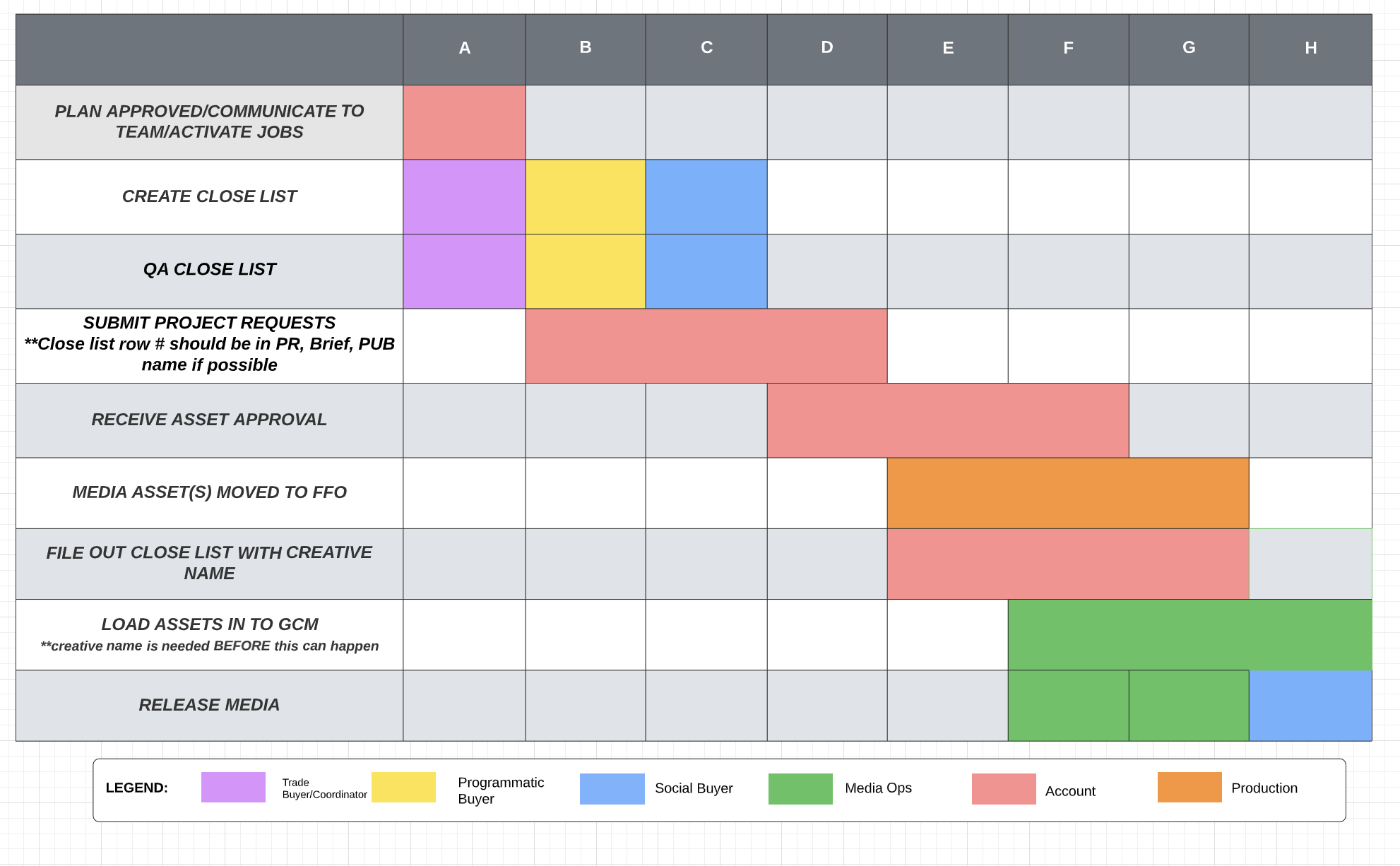
More information on close list creation:
-
- Upon receiving plan approval, account will open jobs, which will help populate close list with job #s and asset needs across channels.
- Kate/Oscar/Noah will create the close list depending on the media approved. Kate will create for Trade, Oscar for programmatic and Noah for social. If all channels are part of the plan, Kate will set up a close list shell and share out. Channel owners are responsible for populating their assets in the close list, in each tab (depending on objective).
- Channel experts are responsible for FULLY QAing their individual close list/asset items, ensuring all assets are accounted for, numbers match up and everything is filled out properly. They should follow up with the account team as needed here.
- Project Requests. The account team is responsible for including the close list row line item #, release date and Pub name in the Project Request (PR) and in Brief for kickoff. If help is needed, refer to Media Ops.
- As assets are approved by clients, the Account Team is responsible for communicating approvals to Production. PMs will ensure appropriate team members are looped in on approvals to ensure a smooth transition of all approved assets to the next step.
- Production will move all approved assets to FFO, double checking briefs to ensure all assets are accounted for. PMs will double check assets against brief as time permits here.
- As assets are approved, Account can fill out the creative names in the close list. **THIS MUST BE FILLED OUT TO CONTINUE TO H. This will be something up to discretion of account; if schedule is tight, and depending on round, account can fill this out sooner rather than later to be mindful of the time Media Ops needs to load in to GCM**
- Once the close list is filled out completely, media ops will add units into GCM for tracking purposes.
- Assets will be released to pubs once step H is complete for each individual asset. Media Ops may release media prior to having line items completely filled out, depending on time.
- If last minute updates are made to the close list, notify everyone on the project. This is true for both account team and media team members.
**ANY DELAY IN NOT FILLING OUT THE CLOSE LIST ON TIME WILL IMPACT DEADLINES**
CLOSE LIST GOOD-TO-KNOWS
- All columns highlighted Gray in Row 1 should be filled out by Media .
- All columns highlighted Blue in Row 1 should be filled out by the Account team.
- Creative should be filled out 30 days in advance. (Before the 1st of every month)
- Specs can be found in on the server (NOTE: this is not all specs, largely specs for the majority of pubs we work with at Marriner):
- /Volumes/Active Jobs/_Media Support/_Specs/DIGITAL specs.
- NOTE: Media buyers should ensure we have the most up to date specs.
- Do not go to the media buyer for spec questions. See Media Ops/Media Coordinator or PM for questions.
- MAIN PUBS WE WORK WITH
- Winsight
- FoodService Director (FSD)
- Restaurant Business (RB)
- Convenience Store Products (CSP)
- Informa
- Food Management (FM)
- National Restaurant News (NRN)
- WTWH (previously Journalistic)
- QSR Digital
- FSR Magazine
- Winsight
- Approved media flowcharts can be found on the server in
- /Volumes/Active Jobs/Media Support
- Account should always include line items from the close list in Project Requests (PRs), Jobs, Briefs for reference. NOTE: Specs tab added to Close Lists for reference as well.
- All inquiries for extensions from publishers should go through Media Ops. Backup here would be Kate/Media Coordinator if media ops is OOO.
- Any inquiries for changes or updates in media buy or placements should be directed to the appropriate channel owner.
Was this post helpful?
Did you find what you were looking for? Is there anything that needs improvement?
Last modified: Tuesday, September 27, 2022 at 10:45 am