URLs, parameters and UTMs
All staffing this email for my easy of use but this really only applies to the account teams so my apologized to those I am spamming.
I wanted to quick run down how URLs work with parameters (also called query strings in nerd speak). Parameters are a way for a webpage to gather and use additional information. We see these most commonly used for UTM tracking and you might also see them frequently on search result pages.
For them to work correctly and for browsers to understand them they follow a specific pattern.
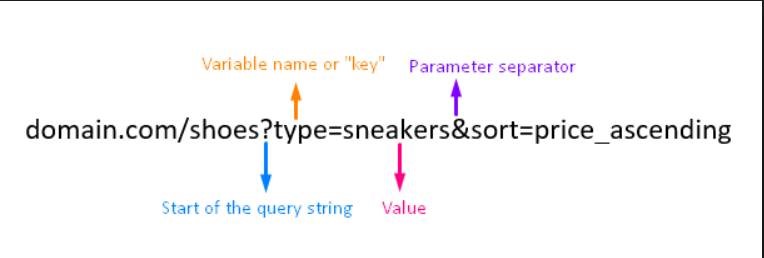
Its very important to know that you can only ever have 1 start of the query string!
Chances are if a URL you are trying to add UTM tracking to already has query string parameters, that tool you are using might just try and slap on a second start to the query string (by added a second ?) Oh no!
Example >
URL with no parameters:
https://www.perdue.com/promotions/
URL with a parameter:
https://www.perdue.com/promotions/?product=simply-smart-organics
URL incorrectly formatted with an extra ?:
https://www.perdue.com/promotions/?product=simply-smart-organics/?utm_source=newsletter&utm_medium=email (a tool tried to add a slash / in there)
URL incorrectly formatted with an NO ?:
Correctly formated URL:
Remember, you can only have one ?
Was this post helpful?
Did you find what you were looking for? Is there anything that needs improvement?
Last modified: Friday, November 22, 2019 at 1:55 pm