Paid Search - What's It All About?
The purpose of this page is to explain paid search and how Marriner builds paid campaigns to support our clients. What is paid search exactly? Let's start there.
Paid Search
Paid Search (aka Search Engine Marketing (SEM) is a term used to describe the various means of marketing a website via search engines, and entails both organic SEO and paid search strategies. Paid search allows you to pay a fee to have your website displayed on the search engine results page (SERP) when someone types in specific keywords or phrases to the search engine. The SERP will display the ads that you create to direct viewers to your site, with the fee you pay usually based on either clicks or on views of these ads. 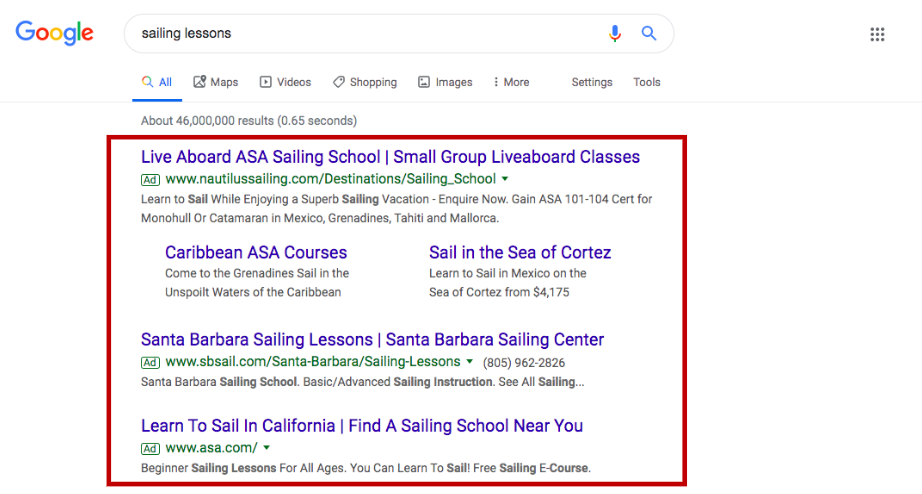
**paid search example
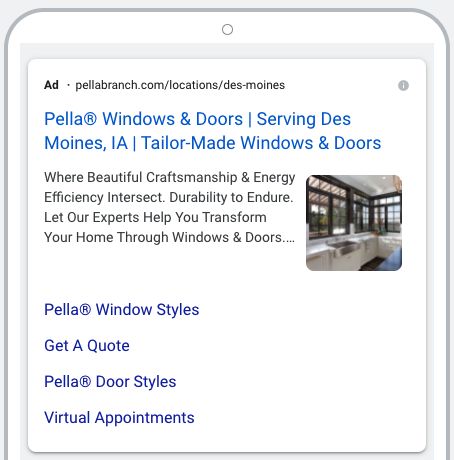
**paid search with image extension example
Here at Marriner, our paid search crew builds an Activation Tracker to help build our paid search ads. What is an Activation Tracker?
Activation Tracker
- The activation tracker is both an internal and external tool, the main purpose of the tracker is to write and build our Google Ads (an example of an activation tracker can be found here).
- Columns A-T are for Marriner internal purposes, these can be disregarded by the client.
- Columns U-AH are client-facing; these contain the ad copy that will be used to build the Google Ads and must be reviewed to make revisions.
- Comments can be made by choosing the cell, clicking the comment button in the right corner, then clicking “add comment”.
Google Ads Basic Overview
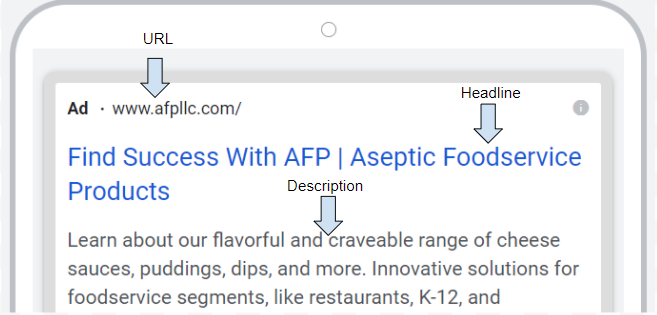
Headlines and descriptions are what make a Google Ad.
-
- We have provided 10 headlines per ad (30 characters max) and 4 descriptions per ad (90 characters max) in our activation tracker example. Below is an example of how users see these while searching on Google.
-
- Only 3 headlines and two descriptions will be selected to show in different combinations and orders. Over time, Google ads will test the most promising ad combinations and learn which are the most relevant for specific queries.
- By providing 10 headlines and 4 descriptions we allow the Google algorithms to choose the best ads possible while simultaneously keeping our content unique and fresh.
Ad Groups Overview
-
- Google ad groups allow you to choose who you want to target you ads towards. You target using keywords.
- Keywords are housed in the second tap of the activation tracker. When these words and phrases are searched on Google, an auction will begin. This auction finds the most relevant ads related to these keywords and shows them to the user.
- Keywords are only internal facing. The user does not know what keywords you are using for targeting.
Brand vs. Non-Brand Ads
-
- Brand vs. non-brand pertains to our keywords. Our brand group is targeting product keywords as well as branded terms, AFP, Savencia, True Dairy.
- Our non-brand group does not use any keywords that are branded. This is to ensure we are reaching users to know about AFP and are looking for you, but also will broaden our audience and create awareness of our brand to users not looking for us. Branded words will still be included in all ad copy.
- Example: A user searches for “cheese sauce” and they are shown an AFP branded ad. The user did not search for “AFP” but they were shown the ad based on our keyword targeting.
Was this post helpful?
Did you find what you were looking for? Is there anything that needs improvement?
Last modified: Tuesday, June 21, 2022 at 3:32 pm